If you have an active Netflix subscription, you can play Grand Theft Auto: San Andreas The Definitive Edition on mobile devices at zero additional charge. Netflix partnered with Rockstar Games to provide full, unrestricted access to the remastered trilogy across both iOS (iPhone and iPad) and Android platforms.
Unlike free-to-play mobile titles, the Netflix edition contains zero commercial advertisements, zero microtransactions, and zero paywalls. As confirmed on the official Netflix Games Help Center, full game access is bundled directly into standard subscription plans. This guide outlines the exact steps to claim and install the game on your smartphone, how to fix compatibility errors, how to activate built-in cheat codes, and how to enable the popular classic lighting mode.
The Netflix Games Partnership Explained
Netflix includes a dedicated mobile games portfolio with every membership tier, ranging from Standard with Ads to the 4K Premium subscription:
- Full Remaster Included: You receive the complete Unreal Engine 4 remaster of San Andreas featuring high-resolution textures, improved lighting, modern steering controls, and GPS route waypoints. According to Rockstar Games Support, the mobile Definitive Edition also supports physical Bluetooth controllers across both iOS and Android.
- Included at No Extra Cost: The game normally costs $19.99 as a standalone purchase on mobile stores, but launches completely free for active Netflix subscribers.
- Cloud Save Integration: Game saves link directly to your Netflix account profile, allowing you to switch between phone and tablet without losing story progress.
Step-by-Step Claim Guide for iPhone and iPad (iOS)
- Open the official Netflix app on your iPhone or iPad and log into your subscriber profile.
- Scroll down the home feed until you see the row labeled Mobile Games, or tap the search icon and type GTA San Andreas.
- Tap on the game card titled GTA: San Andreas Definitive Edition.
- Tap the button labeled Get Game. Netflix will automatically redirect you to the official Apple App Store listing.
- Authenticate using Face ID, Touch ID, or your Apple ID password to start the download.
- Once installed, launch the game from your iOS home screen. When prompted, select your Netflix user profile to complete the license validation.
Step-by-Step Claim Guide for Android Devices
- Open the Netflix app on your Android phone or tablet.
- Tap the Games tab in the bottom navigation bar.
- Select GTA: San Andreas Definitive Edition from the featured list.
- Tap Install Game. The Netflix app will redirect you to the Google Play Store.
- Tap Install on the Play Store page to begin downloading the package.
- Open the game once installation finishes, select your Netflix profile, and begin CJ's campaign!
System Requirements and Free Storage Needs
Because the Definitive Edition runs on Unreal Engine 4 rather than the 2004 RenderWare engine, it demands significantly higher system resources than the classic mobile release:
| Platform | Minimum Operating System | RAM Requirement | Storage Space Needed |
|---|---|---|---|
| Apple iOS / iPadOS | iOS 16.0 or iPadOS 16.0 | 3 GB RAM (iPhone 11 or newer) | 5.0 GB Free Space |
| Google Android | Android 10.0 (64-bit only) | 4 GB RAM or higher | 6.5 GB Free Space |
Important Note: Although the initial download size on the app store is around 2.5GB to 3.0GB, the application decompresses additional high-definition audio and texture assets upon its first launch. Keep at least 7.0GB of free internal memory to prevent sudden installation freezes.
How to Fix "Your Device Isn't Compatible with This Version"
If the Google Play Store or Apple App Store displays an incompatibility notice:
- Update Your OS: Check for pending system updates in your phone settings. Devices running Android 9 or older or iOS 15 cannot run the Definitive Edition engine.
- 32-Bit Processor Limitation: Budget phones with 32-bit system architectures cannot launch the game. If your phone cannot run the Netflix release, our GTA SA Mod APK (v2.11.311) provides optimized low-memory compatibility for broader device support.
- Clear Store Cache: Go to Settings > Apps > Google Play Store > Storage and tap Clear Cache. Sometimes the Play Store caches outdated device profile tags that falsely flag hardware as incompatible.
Entering Cheat Codes in the Netflix Mobile Edition
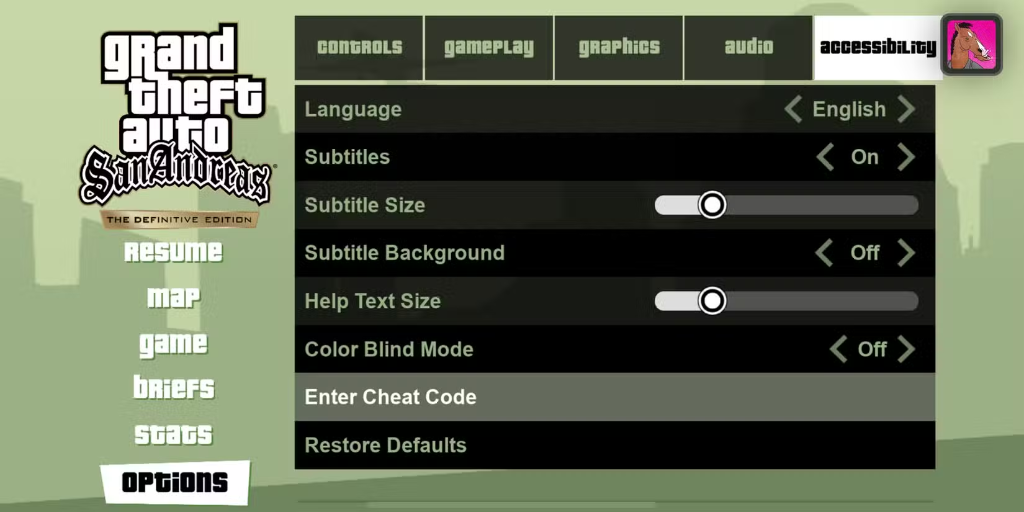
One of the greatest hidden features of the mobile Definitive Edition is a native, built-in cheat code entry menu. You do not need third-party keyboards, root access, or external mod menus:
- Pause the game at any point during active gameplay.
- Select Options from the pause screen.
- Navigate to the Accessibility tab.
- Scroll down and tap Enter Cheat Code.
- Type any standard PC cheat code using the on-screen keyboard and press Submit:
INEEDSOMEHELP $250k + Full Health & ArmorROCKETMAN Spawn JetpackFULLCLIP Infinite AmmunitionBUFFMEUP Maximum Muscle Stat
Graphic Settings: Enabling "Classic Lighting" Mode
Many fans complained that the modern Unreal Engine lighting stripped away the original nostalgic atmosphere of the 2004 PlayStation 2 release. Rockstar responded by adding an exclusive Classic Lighting toggle:
- Pause the game and open Options > Graphics.
- Find the toggle labeled Classic Lighting and turn it ON.
- This immediately restores the iconic golden-orange haze across Los Santos, warm desert sunsets in Bone County, and moody coastal fogs in San Fierro.
Netflix Edition vs Original Mobile Port: Key Differences
| Feature | Netflix Definitive Edition | GTA SA Mod APK (v2.11.311) |
|---|---|---|
| Subscription | Requires active Netflix account | 100% Free standalone install |
| Offline Play | Must verify login periodically | 100% Offline with zero check-ins |
| Mod Support | No CLEO or custom script support | Pre-installed CLEO menu & vehicle spawner |
| Hardware Demand | Demanding (Heats phone quickly) | Optimized for high FPS on all devices |
Frequently Asked Questions
Is GTA San Andreas still available on Netflix in 2026?
Yes. As long as you maintain an active personal or family Netflix subscription, you can download and play the full Definitive Edition mobile game across iOS and Android app stores.
Can you play the Netflix version of GTA San Andreas offline?
You can play offline for short periods, but the app periodically requires an internet connection to re-authenticate your Netflix subscription status. If the license check fails, the game will refuse to boot until you reconnect.
What happens to my save game if I cancel Netflix?
Your cloud saves remain linked to your profile in Netflix's cloud servers. If you reactivate your subscription later, your story missions and checkpoint progress will restore automatically upon logging back in.
Does the Netflix edition have the full original radio station tracks?
Like all post-2014 releases, certain licensed music tracks (such as songs by Michael Jackson and 2Pac) were removed due to expired publishing agreements. However, the radio commercials, talk shows, and iconic DJ voice acting remain 100% intact.
Why is the Netflix version better than the original mobile port?
The Netflix Definitive Edition includes improved draw distances, updated high-polygon character models, a weapon wheel selection menu, instant mission restart checkpoints, and the classic lighting atmosphere toggle.